
 Byadmin
{:en}Control traffic lights with a push button{:}{:ja}タクトスイッチを使って、交通信号の制御{:}
{:en}
This project will imitate cross pedestrian traffic light control with push button switch. We will use three LEDs(RED,YELLOW,GREEN) to imitate traffic lights in main road, use two LEDs(GREEN,RED) to imitate pedestrian cross light, use a push button to imitate pedestrian cross button. When push button is pressed, the GREEN light in main road will turn off and Yellow light will turn on for 2 seconds,then RED light will turn on, then GREEN pedestrian light will turn on. After 4 seconds, the Green pedestrian light will become flashing for 5 seconds and turn off. Red pedestrian will on and Main Road Red light will off and Main road green light will on.
Step 1 – Connect Arduino with LEDs,resistors and push button as per following grahp:
Step 2 – Download crosstrafficlight.ino sketch file and load it into Arduino.
Step 3 – push the button, the main road red traffic light will turn on and pedestrian green light will turn on.
Project Expect Result:
Normal Status: Pedestrian RED light ON, Main Road Green Light ON
Stage 1: Pedestrian push the button
Stage 2: The traffic light in main road will turn YELLOW
Stage 3: Main road Yellow light turn off and Red turn on
Stage 4: Main road Red light turn off and pedestrian Green light will turn on.
Stage 5: Pedestrian Green light become flashing
Stage 6: Pedestrian Green light turn off,Main Road Red light turn off
Stage 7: Pedestrian Red light turn on, Main Road Green light turn on, back to normal status.
Project Demo Video:
{:}{:ja}タクトスイッチを使って、交通信号制御を模倣するのプロジェクトです。車両用信号機(main road traffic light)の模倣は(レッド、黄色い、グリーン)のLEDを使います。歩行者用信号機(cross pedestrian traffic light)の模倣は(グリーン、レッド)のLEDを使います。タクトスイッチは歩行者用制御ボダンとして使用します。
歩行者は制御ボダンを押すと、車両用信号機は黄信号になり、黄信号は2秒続いて、赤信号切り替えます。その同時に、歩行者用信号機は青信号になります。4秒後、歩行者用信号機の青信号は点滅して、点滅5秒続いて、赤信号に切り替えます。その同時に車両用信号機は青信号に切り替えます。
Step 1 – 回路図 (画像をクリックして拡大イメージを表示)
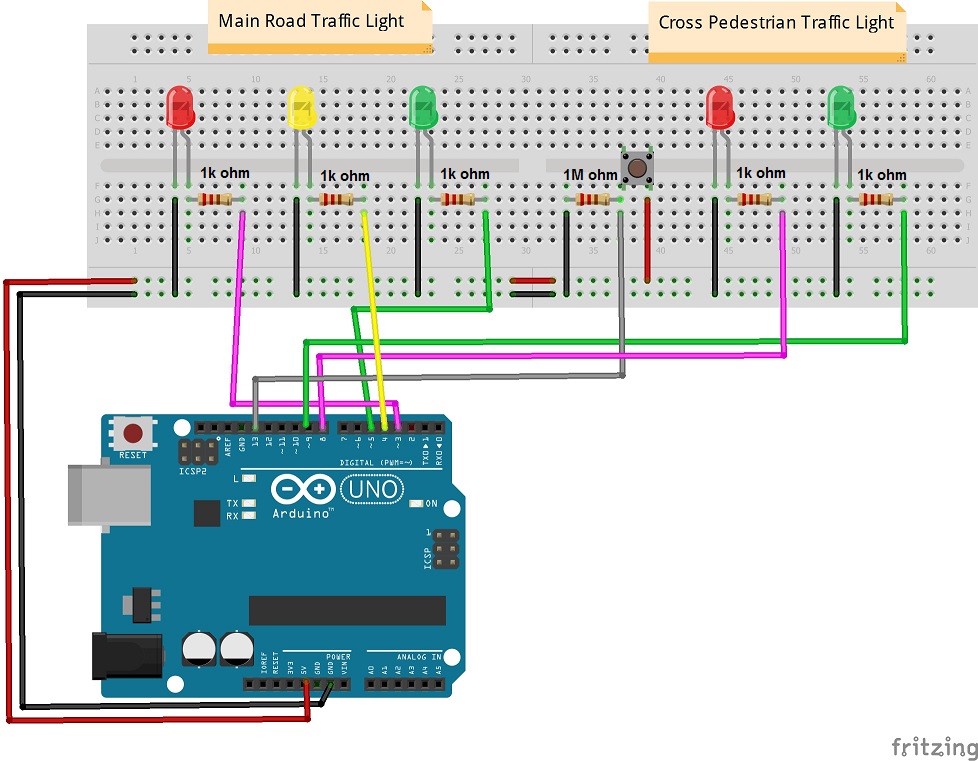
Step 2 – crosstrafficlight.inoというファイルをダウンロードして、 Arduinoにロードしてくださいませ。
Step 3 – 制御ボダンを押すと、車両用信号機は黄信号になり、黄信号は2秒続いて、赤信号切り替えます。その同時に、歩行者用信号機は青信号になります。
プロジェクトの予想結果
最初の状態: 歩行者用信号機は赤信号表示 車両用信号機は青信号表示
Stage 1: 歩行者は制御ボダンを押す
Stage 2: 車両用信号機は黄信号になる
Stage 3: 車両用信号機は黄信号で2秒続いて、赤信号切り替える
Stage 4: 車両用信号機は赤信号になり、歩行者用信号機は青信号になる
Stage 5: 歩行者用信号機の青信号は点滅する
Stage 6:歩行者用信号機の青信号は消す、車両用信号機は赤信号も消す
Stage 7: 歩行者用信号機は赤信号になり、車両用信号機は青信号になる、最初の状態に返す
テストの動画をご覧ください~
{:}

admin administrator
You must be logged in to post a comment
About the Author